 Shusher
A gentle “shh” when voices get loud
Made for autistic kids who shout while using the tablet, and for the families who support them. When a scream is heard, a friendly character pops up and goes “shh”. No scolding, no scares: just a clear signal your child can see.

How it works
It always works the same way, so the reminder is predictable and never startling.
It listens
While the screen is on, it measures how loud the room is. It never records.
It notices a scream
If the sound stays loud for a moment, it counts as a scream. A slammed door or a quick bang doesn’t.

It reminds, gently
The screen dims softly, a character appears and a “shh” plays. Two seconds later, everything is back to normal.
You stay in control
Everything is set up from one simple screen, made for parents, caregivers and therapists.
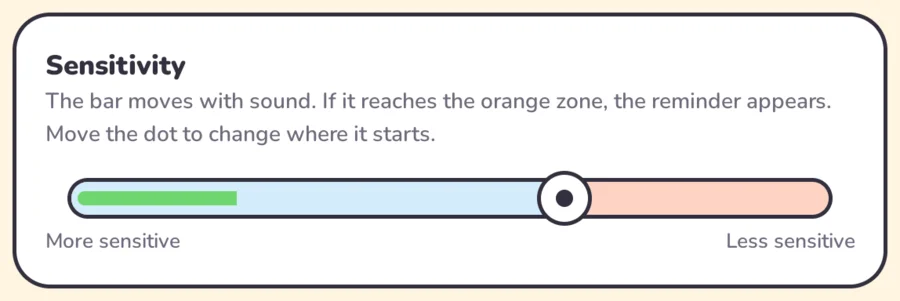
Sensitivity that fits your child
Talk and watch the green bar move. Place the dot just above a normal voice, so only shouts reach the orange zone.
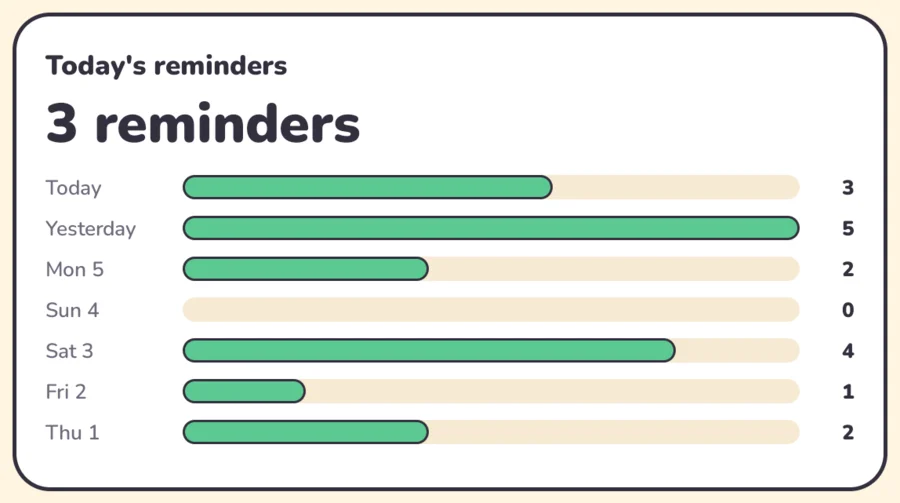
Follow the week
See how many reminders there were today and over the last seven days.
Their favorite characters
It comes with a girl and a boy, and you can add the characters your child already knows and loves (as PNG images). One appears at random with each reminder.





Peppa Pig © Entertainment One (Hasbro). The Backyardigans © Nickelodeon and Nelvana. Shown only as examples of characters you can add; Shusher is not affiliated with them.
Your audio never leaves the device
Shusher doesn’t even have internet access. Sound is only used to measure the volume and is discarded right away. No accounts, no ads, no tracking.
Get Shusher for free
- Download the APK on your Android tablet or phone.
- Open it and, if your device asks, allow installing apps from that source.
- Choose your language and tap Start. That’s it!
Know how to code? Build it from the source code.